The Google Fitbit Air is built around a simple proposition: a fitness tracker should disappear on the wrist during a run and still deliver the metrics that matter afterward. Instead of chasing the bulkiest sensor stack or the most crowded display, this device leans on a compact form factor, comfortable band options, and the familiar Google Health ecosystem to keep training data organized in one place.
For runners, that combination matters more than a long specification sheet. A tracker that shifts during a stride, traps sweat under a stiff strap, or buries its workout data behind three menus tends to get left in a drawer. The Fitbit Air is positioned to avoid that fate by pairing lightweight hardware with bands designed for movement and an app platform that centralizes steps, heart rate, sleep, and exercise sessions.
What the Google Fitbit Air Brings to a Training Week
Fitbit’s own platform documentation describes the core tracking loop clearly: steps, calories, distance, cardio load, readiness, and exercise sessions all feed into the Google Health app. That same framework applies to the Fitbit Air, which means a runner does not need a separate coaching subscription just to see whether weekly mileage is climbing or recovery is slipping. The value sits in consistency rather than novelty, and the hardware is designed to support that consistency by staying comfortable through long wear.
The device also inherits Fitbit’s broader approach to water resistance. Fitbit states that most of its devices are water-resistant to 50 meters, a rating that covers rain, sweat, and post-run rinses without demanding removal before every shower. For runners logging humid summer sessions or winter slush miles, that tolerance removes a small but constant friction point.
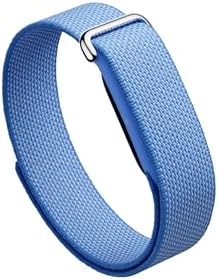
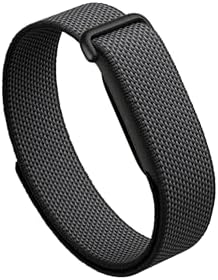
Band choice plays an outsized role in whether a tracker actually gets worn. The Google Fitbit Air Performance Loop Band uses a micro-adjustable loop built from polyester, nylon, and elastane yarn, which allows the fit to be tightened for intervals and loosened for recovery days without swapping hardware. That adjustability is the kind of practical detail that separates a training tool from a fashion accessory.
Band Design and Wrist Stability During Runs
A loop-style band solves a specific problem that buckle straps often create: inconsistent tension. Traditional clasps offer fixed hole spacing, so a strap that feels right at rest can loosen noticeably once sweat and arm swing enter the equation. The performance loop design on the Fitbit Air bands uses a continuous adjustable closure, letting a runner dial in a fit that holds the sensor steady against the wrist.
Sensor stability matters because optical heart rate readings depend on consistent skin contact. A tracker that slides or lifts during a stride can produce gaps or spikes in the heart rate trace, which then distorts cardio load estimates and readiness scores. By keeping the band snug without pinching, the loop design supports cleaner data through the entire run.
The material mix also addresses breathability. Polyester and nylon yarns dry relatively quickly compared with solid silicone, and the woven structure allows some airflow beneath the strap. Runners who log back-to-back sessions will notice this most on the second day, when a damp band from yesterday’s run would otherwise still be clinging to the wrist.
Color selection is a smaller consideration but not an irrelevant one. A woven lavender option, such as the lavender Performance Loop Band, lets the tracker move between workout wear and everyday outfits without looking like a piece of gym equipment, which encourages the all-day wear that step and sleep tracking depend on. Runners who prefer a spare strap in rotation can consider Google Fitbit Air Performance Loop Band Lavender that carries the same closure system and yarn blend for training days.
Everyday Health Metrics Beyond the Run
Running performance does not improve in isolation. Sleep quality, resting heart rate, and daily movement patterns all shape how a runner feels on the next workout, and the Fitbit Air’s tracking extends well past the start and stop of an exercise session. Fitbit’s platform materials reference sleep monitoring, heart rate, and activity tracking as baseline capabilities, and those metrics become more useful when they are collected continuously rather than only during workouts.
The readiness and cardio load features in the Google Health ecosystem are designed to interpret that continuous data. Rather than presenting raw numbers without context, the platform frames them as signals about how hard a runner has been training and how well the body is absorbing that work. For runners who tend to push through fatigue, that framing can serve as a useful external check.
Sleep and Recovery Tracking
Sleep tracking on Fitbit devices breaks down time in bed, sleep stages, and interruptions, then surfaces trends over weeks rather than single nights. A runner preparing for a race can look back at whether sleep duration dropped during peak mileage weeks and adjust accordingly. The Fitbit Air’s low-profile design supports this function because a slimmer tracker is less likely to be removed before bed.
Heart Rate and Workout Sessions
Heart rate monitoring runs continuously through the day and during recorded exercise sessions, allowing the platform to calculate metrics like cardio load afterward. Runners who track intervals, tempo runs, and easy days separately get a clearer picture of intensity distribution than they would from a single weekly total. The Fitbit Air is designed to capture these sessions through the Google Health app with minimal setup.
Fit Within the Google Health App Ecosystem
Data is only useful if it can be found and compared. Fitbit’s move toward the Google Health app consolidates tracking data into a single dashboard, and the Fitbit Air operates within that structure. Steps, exercise sessions, sleep, and readiness sit alongside each other, which makes it easier to spot correlations, such as whether poor sleep consistently precedes a dip in readiness scores.
The Fitbit collection also supports Google Health Premium features, including coaching-style guidance built around daily movement and recovery. Runners who want a more structured interpretation of their data can use those tools, while those who prefer to draw their own conclusions can work directly from the basic dashboards.
Compatibility with the broader Google ecosystem is part of the appeal for users already invested in Android or Pixel devices. Synchronization happens without a separate bridge app, and account management follows the same Google identity used elsewhere. That reduces the setup friction that often discourages people from tracking consistently in the first place.
Who Should Consider the Google Fitbit Air
The Fitbit Air makes the most sense for runners who prioritize comfort, all-day tracking, and a clean data experience over advanced training metrics. Athletes who rely on advanced running dynamics, detailed GPS route analysis, or altitude data typically look toward dedicated GPS watches, which offer those features at a different price and bulk level. The Fitbit Air instead targets the broader group of runners who want consistent tracking without a heavy wrist presence.
It also suits runners who are new to structured training. The readiness and cardio load framework gives beginners a reference point for balancing hard sessions with recovery, without requiring them to interpret raw heart rate variability or power data. The learning curve stays gentle, and the device’s everyday comfort makes daily wear more likely.
Practical Considerations Before Buying
Prospective buyers should think about their typical training environment. Road runners, treadmill users, and casual trail runners will find the Fitbit Air’s tracking sufficient. Runners training for marathons or ultras, where pace stability, elevation profiles, and multi-hour battery endurance become central, usually need a device with built-in GPS and more specialized metrics.
Band compatibility is another factor worth checking before purchase. The Fitbit Air uses dedicated band accessories, including the loop-style performance options, so buyers should confirm that the straps they want are available for the exact model. The micro-adjustable closure on the performance loop bands requires the proper Fitbit Air fitment, and checking compatibility early prevents a frustrating return.
Finally, consider how the device fits into an existing routine. Runners already using the Google Health app will find the transition smooth, while those coming from a different platform should budget a few days to learn the dashboard layout and how readiness scores respond to their training patterns.
A Tracker Built Around Wearing It Every Day
The Google Fitbit Air treats running as one part of a longer health picture rather than a standalone competition. Its lightweight build, adjustable performance bands, water-resistant housing, and integration with Google Health all point in the same direction: a device that stays on the wrist through workouts, workdays, and sleep, collecting the continuous data that makes training insight possible. For runners who value comfort and consistency over raw specification depth, that approach offers a practical path to better-informed training decisions and a clearer view of how daily habits shape performance over time.